Setting a Default Table View
Last updated: February 26, 2026
Prerequisites
Plans: Any
Deployments: Any
Use case: Custom Views with Tables
Use case
In order to set a default view, with any of the tables located on pages like Experiments, Logs, and Datasets.
Features used
The custom table view functionality.
Steps
Step 1: Apply the filters and display settings you want.
Step 2: Select Save as in the toolbar.
Step 3: Enter a view name.
Step 4: Click Create.
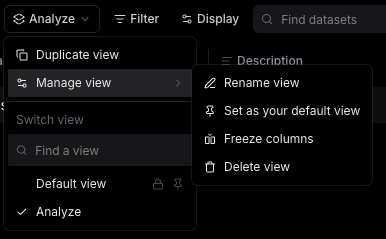
Step 5: Click the Views dropdown in the table header.
Step 6: Hover over Manage View.
Step 7: Select Set as your Default View.
You cannot set default views for all users at the Organizational level, they are user specific.