Human Review spans not displaying in UI
Last updated: February 11, 2026
This issue is applicable to customers matching these conditions
Plans: Any
Deployments: Any
Use case: viewing items for human review in the web UI
Issue
While looking in the Review page at /app/<your org>/p/<your project>/review, no spans are displayed for review when previously seen or expected.
You will see a message in the UI similar to "No spans found in the past 1 hour", or "No more data found in this time range".
Cause
Spans are automatically filtered by last updated time on the Review page. There may be no spans from the selected timeframe, or existing spans may have aged out of the filter of the previously selected view compared to the current time.
Resolution
To view spans from different timeframes, you can edit the selected filter in the top right of the view to the right of the "Search traces" bar.
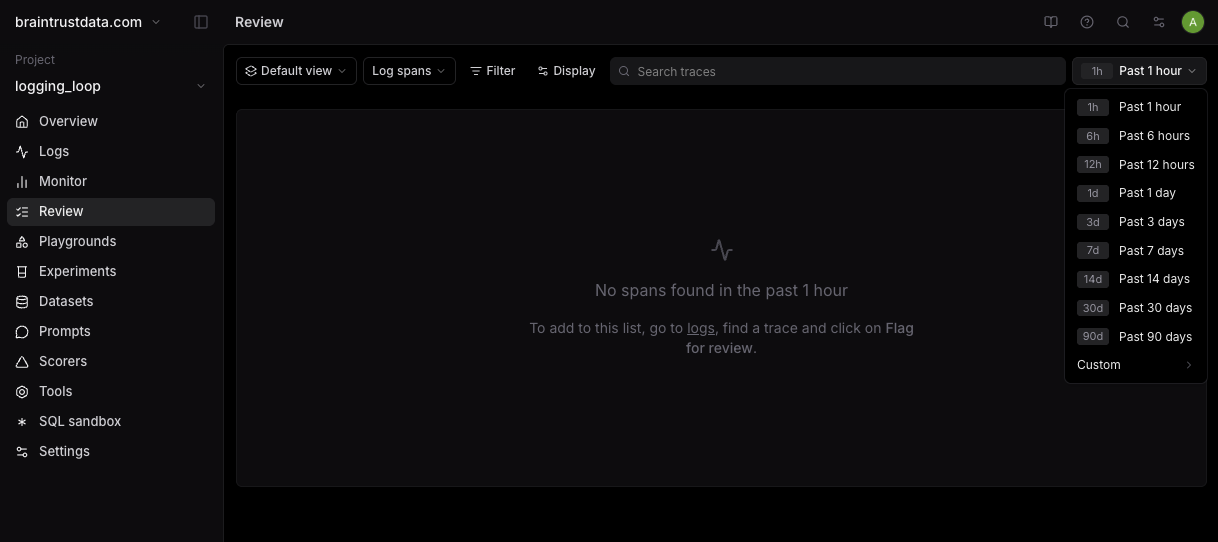
To update the time filter on your default view:
Edit the time filter to a new selection
Click "Save as" on the Default view to create a new custom view, or "Save" if already in a custom view