Slack support with @Braintrust Support
Last updated: March 18, 2026
Slack Connect channels shared with Braintrust are monitored by our @Braintrust Support integration to automatically search our documentation and knowledge base, help route questions, and track conversations you have with the Braintrust team.
How to use
Post in the channel normally, if a question appears to be technical in nature the bot will turn it into a Ticket and return a ticket number in-thread.
If a conversation isn't issued a ticket number, you can tag @Braintrust Support in a reply or react to a message with a 🎫 (
:ticket:) emoji to convert it into a tracked ticket.
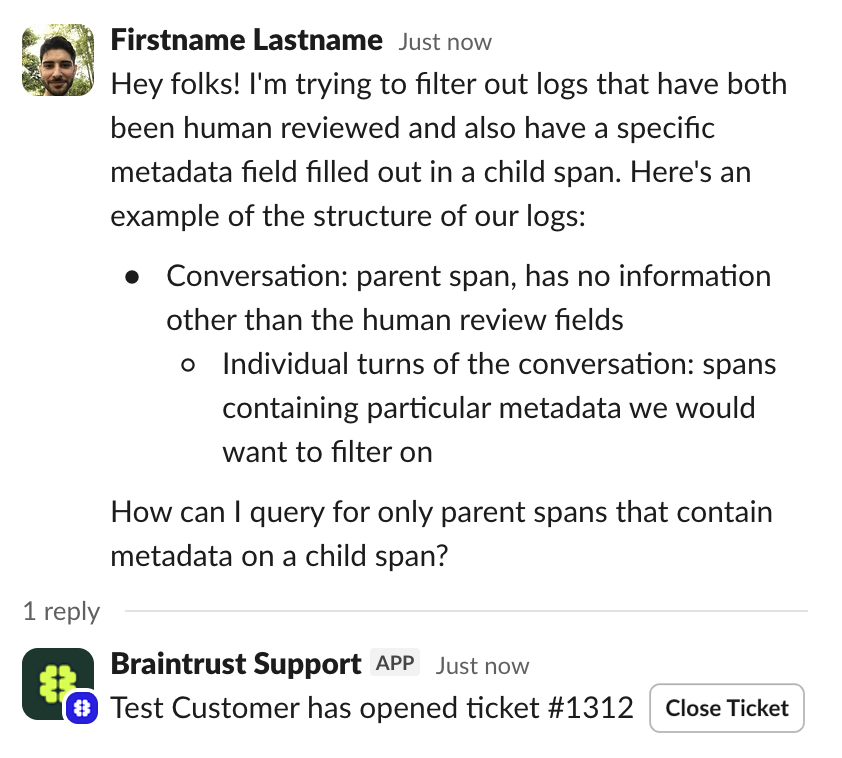
Next, the bot will search for suggested answers or ask a quick follow-up question if the topic is well documented. Including context and details on your asks helps us match known answers immediately, and allows our team to help with complex issues more quickly.
A clear description of what you are trying to do
Any relevant error text (copy/paste) or screenshots
Links, request IDs, or timestamps if applicable
For new or similar questions, open a separate request while referencing the last ticket number or linking to the message for context.
Escalating to humans or for urgent issues
The @Braintrust Support bot will escalate to humans
If no documented advice is available your thread will be escalated to the right Braintrust contact right away.
The bot will escalate if it is ever uncertain or thinks a topic requires help from a team member with a different level of access.
If you don’t reply back to a suggestion from the bot, the thread will auto escalate for human review.
After the initial bot triage, we review each initial and ongoing reply to assess severity level. If an issue is becoming more severe please share that context as a reply within the thread and we will prioritize next steps according to your MSA with Braintrust.
Tracking support requests
All tickets (including ones opened through Slack) are trackable in our support portal located at support.braintrust.dev. Talk with your account manager about getting onboarded onto accessing the portal if your organization isn't yet using it.
More info here: Managing your organization's support requests