Generate stable experiment permalinks
Last updated: February 20, 2026
Summary
Experiment URLs break when you rename experiments because they use name-based paths. Permalinks use object IDs instead of names, ensuring shared links remain valid even after renaming experiments. Use the permalink button in the UI to generate stable URLs that always redirect to the correct experiment.
Applicable To
Plans: Any
Deployments: Any
Why Use Permalinks
Standard experiment URLs like /project/experiment-name break when you rename the experiment, making shared links unusable. Permalinks solve this by using the experiment's unique object ID instead of its name, ensuring links remain valid permanently. This is essential for:
Sharing experiment results with team members
Bookmarking experiments for future reference
Including stable links in documentation or reports
Configuration Steps
Step 1: Use the permalink button in the UI
Click the permalink button in the experiment or dataset view to automatically copy a stable URL.
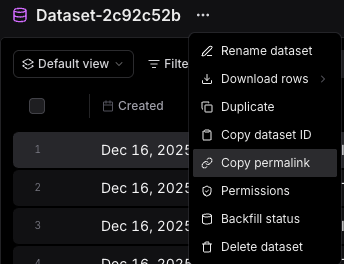
The button generates a URL in this format: /object?object_type=experiment&object_id={experiment_id}
Step 2: Manually construct permalinks (alternative method)
Build the permalink using the experiment ID from the API or UI:
https://braintrust.dev/object?object_type=experiment&object_id={experiment_id}Step 3: Share the permalink
Use the object ID-based URL for sharing; it redirects to the canonical page even after renaming.